
/home/runner/work/sds270/sds270/lecturesbash
Mini-Lecture 18
Ben Baumer
Smith College
2024-11-19
The command line
What is UNIX?
UNIX history

The shell
The file system
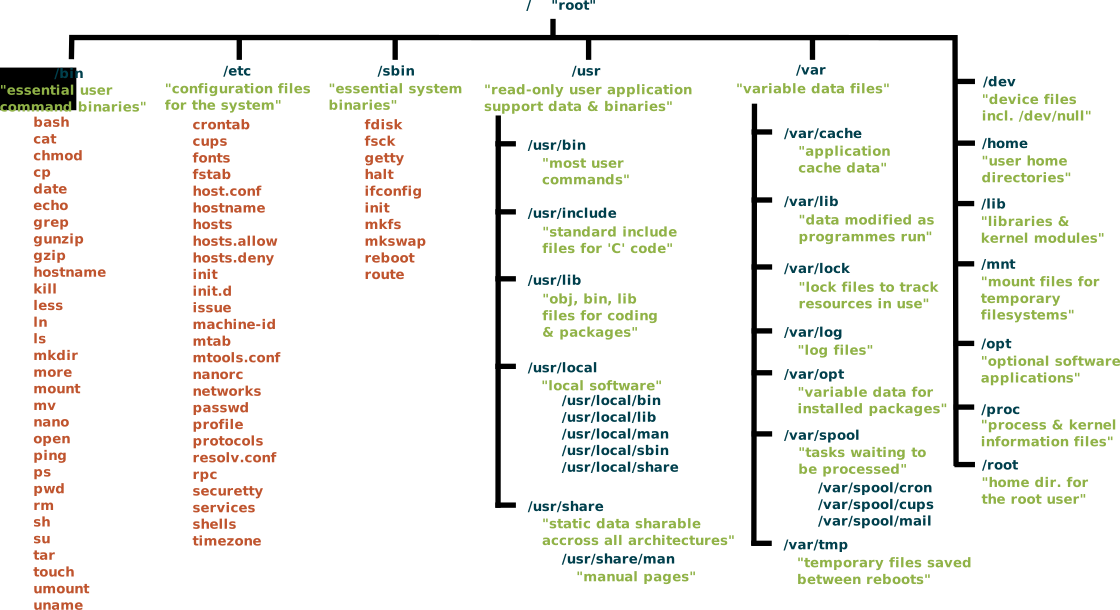
Navigating the file system
- Learn these nine commands:
pwd,cd,lsmkdir,cp,mv,rm,lnman
Where are you?
pwd: print working directory
Moving around
cd: change directory
Shortcuts

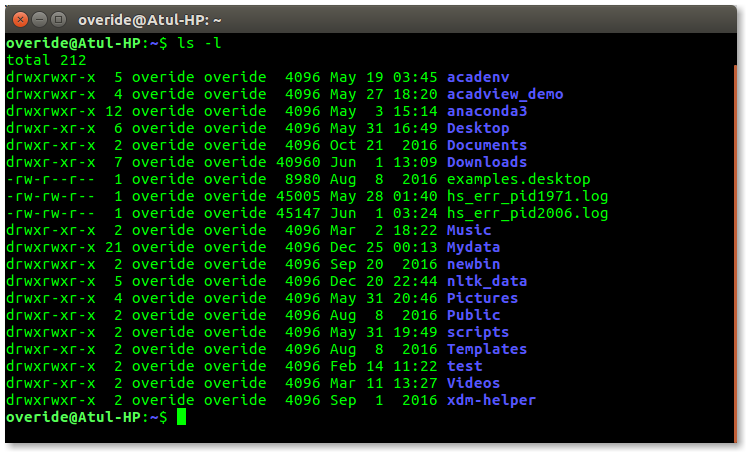
What’s in there?
- list contents of directory
- use options
total 816K
-rw-r--r--  1 runner docker 114K Dec  3 13:51 03-github.html
-rw-r--r--  1 runner docker  61K Dec  3 13:52 10-environments.html
-rw-r--r--  1 runner docker  46K Dec  3 13:52 08-functionals.html
-rw-r--r--  1 runner docker  42K Dec  3 13:51 02-vectors.html
-rw-r--r--  1 runner docker  42K Dec  3 13:52 12-s3.html
-rw-r--r--  1 runner docker  40K Dec  3 13:52 05-control-flow.html
-rw-r--r--  1 runner docker  40K Dec  3 13:52 11-conditions.html
-rw-r--r--  1 runner docker  39K Dec  3 13:52 07-more_functions.html
-rw-r--r--  1 runner docker  39K Dec  3 13:52 06-functions.html
-rw-r--r--  1 runner docker  39K Dec  3 13:51 01-names.html
-rw-r--r--  1 runner docker  38K Dec  3 13:52 04-subsetting.html
-rw-r--r--  1 runner docker  34K Dec  3 13:52 17-testing.html
-rw-r--r--  1 runner docker  26K Dec  3 13:52 16-checking.html
-rw-r--r--  1 runner docker  22K Dec  3 13:52 15-package_data.html
-rw-r--r--  1 runner docker  21K Dec  3 13:52 14-package.html
-rw-r--r--  1 runner docker 7.5K Dec  3 13:52 xaringan-themer.css
-rw-r--r--  1 runner docker 6.9K Dec  3 13:49 01-names.qmd
-rw-r--r--  1 runner docker 6.0K Dec  3 13:49 _09-mapreduce.Rmd
-rw-r--r--  1 runner docker 5.8K Dec  3 13:49 04-subsetting.qmd
-rw-r--r--  1 runner docker 5.6K Dec  3 13:49 02-vectors.qmd
-rw-r--r--  1 runner docker 4.8K Dec  3 13:49 12-s3.qmd
-rw-r--r--  1 runner docker 4.8K Dec  3 13:49 11-conditions.qmd
-rw-r--r--  1 runner docker 4.8K Dec  3 13:49 08-functionals.qmd
-rw-r--r--  1 runner docker 4.3K Dec  3 13:52 18-bash.rmarkdown
-rw-r--r--  1 runner docker 4.2K Dec  3 13:49 05-control-flow.qmd
-rw-r--r--  1 runner docker 4.2K Dec  3 13:49 18-bash.qmd
drwxr-xr-x  3 runner docker 4.0K Dec  3 13:52 .
drwxr-xr-x 11 runner docker 4.0K Dec  3 13:51 ..
drwxr-xr-x  3 runner docker 4.0K Dec  3 13:52 07-more_functions_files
-rw-r--r--  1 runner docker 3.5K Dec  3 13:49 07-more_functions.qmd
-rw-r--r--  1 runner docker 3.3K Dec  3 13:49 _13-projects.Rmd
-rw-r--r--  1 runner docker 3.3K Dec  3 13:49 10-environments.qmd
-rw-r--r--  1 runner docker 3.3K Dec  3 13:49 16-checking.qmd
-rw-r--r--  1 runner docker 3.1K Dec  3 13:49 06-functions.qmd
-rw-r--r--  1 runner docker 3.0K Dec  3 13:49 _19-div_ii_recap.Rmd
-rw-r--r--  1 runner docker 2.8K Dec  3 13:49 03-github.qmd
-rw-r--r--  1 runner docker 2.4K Dec  3 13:49 17-testing.qmd
-rw-r--r--  1 runner docker 2.2K Dec  3 13:49 21-gh-actions.qmd
-rw-r--r--  1 runner docker 1.7K Dec  3 13:49 20-readme.qmd
-rw-r--r--  1 runner docker 1.1K Dec  3 13:49 15-package_data.qmd
-rw-r--r--  1 runner docker  860 Dec  3 13:49 14-package.qmd
Creation
cp: copy files
Destruction
rm: remove files – BEWARE!!
sudo rm -rf /


Symbolic links
Paths
- Relative paths (relative to the current working directory)
/home/runner/work/sds270/sds270/lectures
---
title: "Bash"
format:
  html:
css: ['lab.css', 'smith.css']- Absolute paths (go all the way back to root)
Getting help
man: read themanual
LN(1)                            User Commands                           LN(1)

NAME
       ln - make links between files

SYNOPSIS
       ln [OPTION]... [-T] TARGET LINK_NAME
       ln [OPTION]... TARGET
       ln [OPTION]... TARGET... DIRECTORY
       ln [OPTION]... -t DIRECTORY TARGET...

DESCRIPTION
       In  the  1st form, create a link to TARGET with the name LINK_NAME.  In
       the 2nd form, create a link to TARGET in the current directory.  In the
       3rd  and  4th  forms, create links to each TARGET in DIRECTORY.  Create
       hard links by default, symbolic links  with  --symbolic.   By  default,
       each  destination  (name  of  new link) should not already exist.  When
       creating hard links, each TARGET must exist.  Symbolic links  can  hold
       arbitrary  text;  if  later resolved, a relative link is interpreted in
       relation to its parent directory.

       Mandatory arguments to long options are  mandatory  for  short  options
       too.

       --backup[=CONTROL]
              make a backup of each existing destination file

       -b     like --backup but does not accept an argument

       -d, -F, --directory
              allow  the  superuser to attempt to hard link directories (note:
              will probably fail due to system restrictions, even for the  su‐
              peruser)

       -f, --force
              remove existing destination files

       -i, --interactive
              prompt whether to remove destinations

       -L, --logical
              dereference TARGETs that are symbolic links

       -n, --no-dereference
              treat  LINK_NAME  as a normal file if it is a symbolic link to a
              directory

       -P, --physical
              make hard links directly to symbolic links

       -r, --relative
              create symbolic links relative to link location

       -s, --symbolic
              make symbolic links instead of hard links

       -S, --suffix=SUFFIX
              override the usual backup suffix

       -t, --target-directory=DIRECTORY
              specify the DIRECTORY in which to create the links

       -T, --no-target-directory
              treat LINK_NAME as a normal file always

       -v, --verbose
              print name of each linked file

       --help display this help and exit

       --version
              output version information and exit

       The  backup  suffix  is  '~',  unless  set  with   --suffix   or   SIM‐
       PLE_BACKUP_SUFFIX.   The version control method may be selected via the
       --backup option or through the  VERSION_CONTROL  environment  variable.
       Here are the values:

       none, off
              never make backups (even if --backup is given)

       numbered, t
              make numbered backups

       existing, nil
              numbered if numbered backups exist, simple otherwise

       simple, never
              always make simple backups

       Using  -s ignores -L and -P.  Otherwise, the last option specified con‐
       trols behavior when a TARGET is a symbolic link, defaulting to -P.

AUTHOR
       Written by Mike Parker and David MacKenzie.

REPORTING BUGS
       GNU coreutils online help: <https://www.gnu.org/software/coreutils/>
       Report any translation bugs to <https://translationproject.org/team/>

COPYRIGHT
       Copyright © 2020 Free Software Foundation, Inc.   License  GPLv3+:  GNU
       GPL version 3 or later <https://gnu.org/licenses/gpl.html>.
       This  is  free  software:  you  are free to change and redistribute it.
       There is NO WARRANTY, to the extent permitted by law.

SEE ALSO
       link(2), symlink(2)

       Full documentation <https://www.gnu.org/software/coreutils/ln>
       or available locally via: info '(coreutils) ln invocation'

GNU coreutils 8.32               February 2024                           LN(1)
Now
Homework
Optional command line lab
Work on R package

SDS 410