starwars |>
filter(eye_color == "blue")Subsetting
In this lab, we will learn how to subset vectors and lists.
Goal: by the end of this lab, you will be able to understand why different subset operators return objects of different types.
Operators
The three main subset operators are [, [[ and $. In addition, you will see functions that perform subsetting operations like:
dplyr::filter(): thetidyverseway to select a subset of the rows of a data frame.dplyr::select(): thetidyverseway to select a subset of the columns of a data frame.dplyr::pull(): atidyversefunction analogous to[[.data.frame.purrr::pluck(): atidyversefunction analogous to[[.
Note
Technically, [, [[ and $ are also functions.
It’s probably best to avoid these other similar functions:
subset(): the base R way to select a subset of the rows of a data frame.rvest::pluck(): similar topurrr::pluck()but not as goodmagrittr::extract(): a wrapper to[magrittr::extract2(): a wrapper to[[
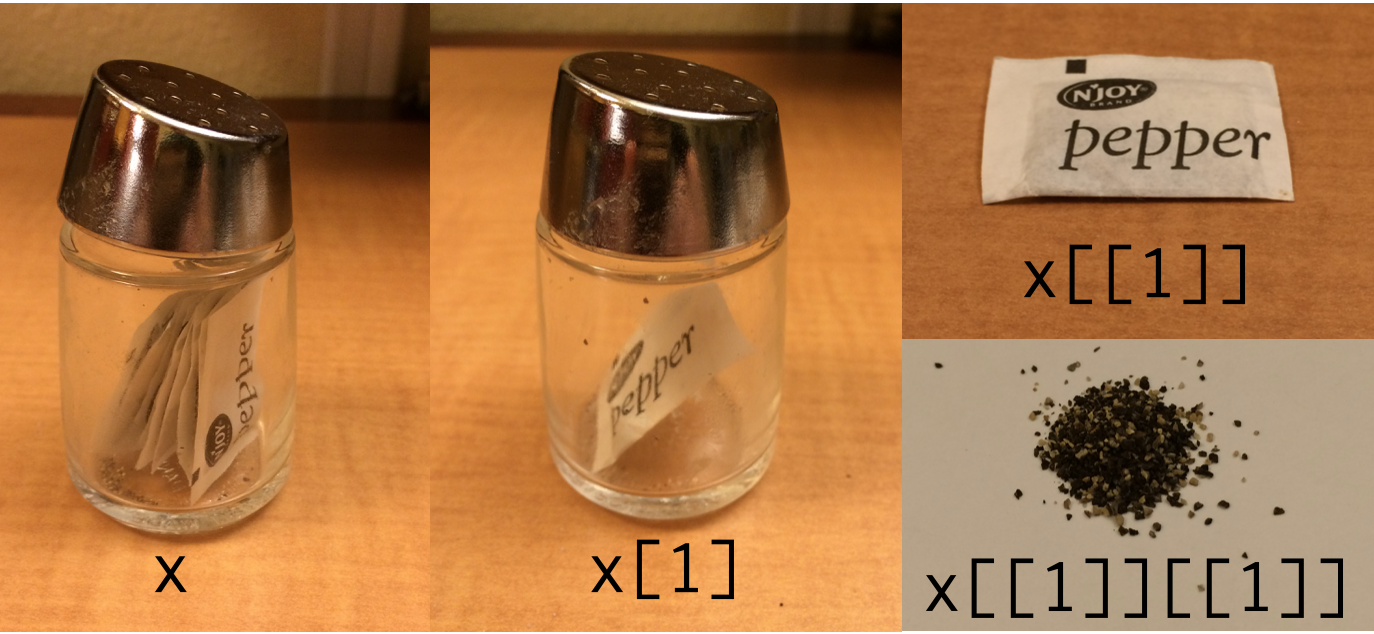
This post is helpful. If x is a list, then:
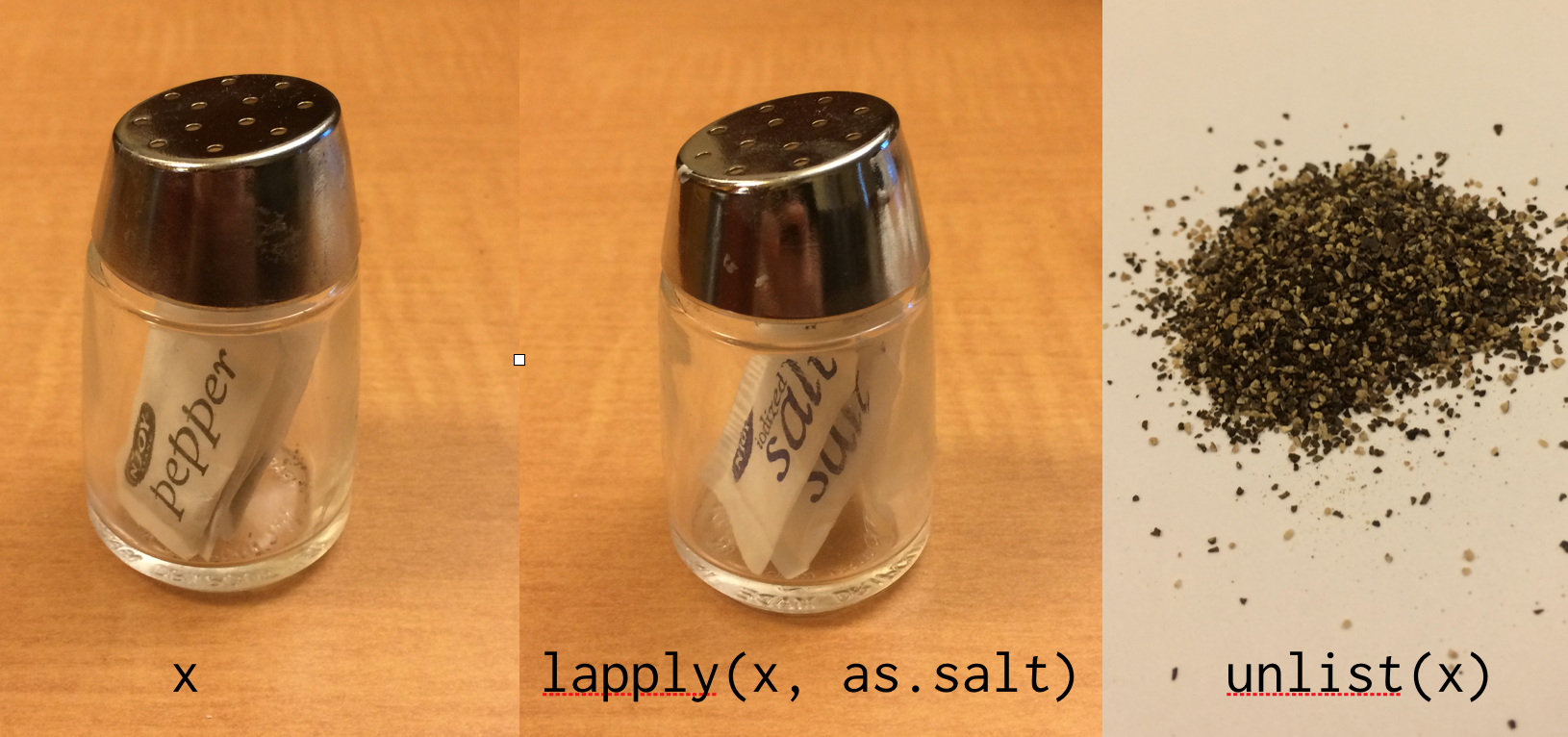
I like this one, too:
Indexing
Key idea: there are six different ways to index a vector (or list).
The three main most commonly used ways are:
- with a numeric vector that selects the elements by index
- with a logical vector that selects the elements that are
TRUE - with a character vector that selects the elements by name
Note that indexing by logical vector will generally return an object of the same length as the original (or smaller), whereas indexing by numeric vector can return an object of any length.
Using dplyr, we would normally find the blue-eyed characters using filter().
Instead, we’ll use the base R functionality for subsetting vectors. First, we compute a logical vector that indicates whether each character has blue eyes.
lgl <- starwars$eye_color == "blue"
lgl
[1] TRUE FALSE FALSE FALSE FALSE TRUE TRUE FALSE FALSE FALSE TRUE TRUE
[13] TRUE FALSE FALSE FALSE FALSE TRUE FALSE FALSE FALSE FALSE FALSE FALSE
[25] TRUE FALSE TRUE FALSE FALSE FALSE TRUE FALSE TRUE FALSE FALSE FALSE
[37] FALSE TRUE FALSE FALSE FALSE FALSE FALSE FALSE FALSE FALSE FALSE FALSE
[49] FALSE FALSE FALSE FALSE FALSE TRUE FALSE FALSE FALSE TRUE FALSE FALSE
[61] TRUE FALSE TRUE TRUE FALSE FALSE FALSE FALSE FALSE FALSE FALSE FALSE
[73] TRUE FALSE FALSE FALSE FALSE FALSE TRUE FALSE FALSE FALSE FALSE FALSE
[85] FALSE FALSE FALSE- Use
[andlglto compute the subset ofstarwarscharacters who have blue eyes.
# SAMPLE SOLUTION

starwars[lgl, ]
# A tibble: 19 × 14
name height mass hair_color skin_color eye_color birth_year sex gender
<chr> <int> <dbl> <chr> <chr> <chr> <dbl> <chr> <chr>
1 Luke Sk… 172 77 blond fair blue 19 male mascu…
2 Owen La… 178 120 brown, gr… light blue 52 male mascu…
3 Beru Wh… 165 75 brown light blue 47 fema… femin…
4 Anakin … 188 84 blond fair blue 41.9 male mascu…
5 Wilhuff… 180 NA auburn, g… fair blue 64 male mascu…
6 Chewbac… 228 112 brown unknown blue 200 male mascu…
7 Jek Ton… 180 110 brown fair blue NA <NA> <NA>
8 Lobot 175 79 none light blue 37 male mascu…
9 Mon Mot… 150 NA auburn fair blue 48 fema… femin…
10 Qui-Gon… 193 89 brown fair blue 92 male mascu…
11 Finis V… 170 NA blond fair blue 91 male mascu…
12 Ric Olié 183 NA brown fair blue NA male mascu…
13 Adi Gal… 184 50 none dark blue NA fema… femin…
14 Mas Ame… 196 NA none blue blue NA male mascu…
15 Cliegg … 183 NA brown fair blue 82 male mascu…
16 Luminar… 170 56.2 black yellow blue 58 fema… femin…
17 Barriss… 166 50 black yellow blue 40 fema… femin…
18 Jocasta… 167 NA white fair blue NA fema… femin…
19 Tarfful 234 136 brown brown blue NA male mascu…
# ℹ 5 more variables: homeworld <chr>, species <chr>, films <list>,
# vehicles <list>, starships <list>Alternatively, we could use the which() function to return an integer vector of the corresponding indices.
num <- which(starwars$eye_color == "blue")
num
[1] 1 6 7 11 12 13 18 25 27 31 33 38 54 58 61 63 64 73 79- Use
[andnumto compute the subset ofstarwarscharacters who have blue eyes.
# SAMPLE SOLUTION

starwars[num, ]
# A tibble: 19 × 14
name height mass hair_color skin_color eye_color birth_year sex gender
<chr> <int> <dbl> <chr> <chr> <chr> <dbl> <chr> <chr>
1 Luke Sk… 172 77 blond fair blue 19 male mascu…
2 Owen La… 178 120 brown, gr… light blue 52 male mascu…
3 Beru Wh… 165 75 brown light blue 47 fema… femin…
4 Anakin … 188 84 blond fair blue 41.9 male mascu…
5 Wilhuff… 180 NA auburn, g… fair blue 64 male mascu…
6 Chewbac… 228 112 brown unknown blue 200 male mascu…
7 Jek Ton… 180 110 brown fair blue NA <NA> <NA>
8 Lobot 175 79 none light blue 37 male mascu…
9 Mon Mot… 150 NA auburn fair blue 48 fema… femin…
10 Qui-Gon… 193 89 brown fair blue 92 male mascu…
11 Finis V… 170 NA blond fair blue 91 male mascu…
12 Ric Olié 183 NA brown fair blue NA male mascu…
13 Adi Gal… 184 50 none dark blue NA fema… femin…
14 Mas Ame… 196 NA none blue blue NA male mascu…
15 Cliegg … 183 NA brown fair blue 82 male mascu…
16 Luminar… 170 56.2 black yellow blue 58 fema… femin…
17 Barriss… 166 50 black yellow blue 40 fema… femin…
18 Jocasta… 167 NA white fair blue NA fema… femin…
19 Tarfful 234 136 brown brown blue NA male mascu…
# ℹ 5 more variables: homeworld <chr>, species <chr>, films <list>,
# vehicles <list>, starships <list>Compute the length of
lglandnum. Are they the same? Why or why not?Make sure that you understand the difference between what is happening in the first two exercises.
Resampling
In addition to subsetting, you can also use index vectors to resample, or even oversample, a vector.
For example, we could double the previous results by repeating the index vector.
# note error!
starwars[c(lgl, lgl), ]
Error in `starwars[c(lgl, lgl), ]`:
! Can't subset rows with `c(lgl, lgl)`.
✖ Logical subscript `c(lgl, lgl)` must be size 1 or 87, not 174.# works, but not necessarily as intended -- output suppressed
# as.data.frame(starwars)[c(lgl, lgl), ]
# no warning
starwars[c(num, num), ]# A tibble: 38 × 14
name height mass hair_color skin_color eye_color birth_year sex gender
<chr> <int> <dbl> <chr> <chr> <chr> <dbl> <chr> <chr>
1 Luke Sk… 172 77 blond fair blue 19 male mascu…
2 Owen La… 178 120 brown, gr… light blue 52 male mascu…
3 Beru Wh… 165 75 brown light blue 47 fema… femin…
4 Anakin … 188 84 blond fair blue 41.9 male mascu…
5 Wilhuff… 180 NA auburn, g… fair blue 64 male mascu…
6 Chewbac… 228 112 brown unknown blue 200 male mascu…
7 Jek Ton… 180 110 brown fair blue NA <NA> <NA>
8 Lobot 175 79 none light blue 37 male mascu…
9 Mon Mot… 150 NA auburn fair blue 48 fema… femin…
10 Qui-Gon… 193 89 brown fair blue 92 male mascu…
# ℹ 28 more rows
# ℹ 5 more variables: homeworld <chr>, species <chr>, films <list>,
# vehicles <list>, starships <list>Application
Remember that a data frame is just a list of vectors (of the same length)! Thus, the subsetting rules governing lists also apply to data frames.
- What is the type of the result of
starwars["name"]?
# SAMPLE SOLUTION

class(starwars["name"])
[1] "tbl_df" "tbl" "data.frame"- What is the type of the result of
starwars[["name"]]?
# SAMPLE SOLUTION

class(starwars[["name"]])
[1] "character"- What is the type of the result of
starwars$name?
# SAMPLE SOLUTION

class(starwars$name)
[1] "character"Storing the names of variables in vectors can be counter-intuitive. Note that [ will work, $ will not, and [[ will work only with vectors of length 1.
vars <- c("name", "height")

# works
starwars[, vars]
# A tibble: 87 × 2
name height
<chr> <int>
1 Luke Skywalker 172
2 C-3PO 167
3 R2-D2 96
4 Darth Vader 202
5 Leia Organa 150
6 Owen Lars 178
7 Beru Whitesun Lars 165
8 R5-D4 97
9 Biggs Darklighter 183
10 Obi-Wan Kenobi 182
# ℹ 77 more rows# doesn't work
starwars[[vars]]Error in `starwars[[vars]]`:
! Can't extract column with `vars`.
✖ Subscript `vars` must be size 1, not 2.# doesn't work
starwars$varsWarning: Unknown or uninitialised column: `vars`.NULLThe behavior is also different when the vector of names is of length one.
my_var <- c("name")

# works
starwars[, my_var]

# works!
starwars[[my_var]]

# doesn't work
starwars$my_var
These inconsistencies are some of the many reasons to use the selection operators in select() instead.
?tidyselect::select_helpers- Why does
starwars[[vars]]throw an error, butstarwars[[my_var]]works? What is the logical inconsistency in the first case?
Engagement
Take a minute to think about what questions you still have about subsetting. Review what questions have been posted (in the #questions channel) recently by other students and either:
- respond (e.g., react, comment, clarify, or answer)
- post a new question